
By FxTrusts Research Team. Last updated: 7 November 2026.
What a forex CRM does for a broker
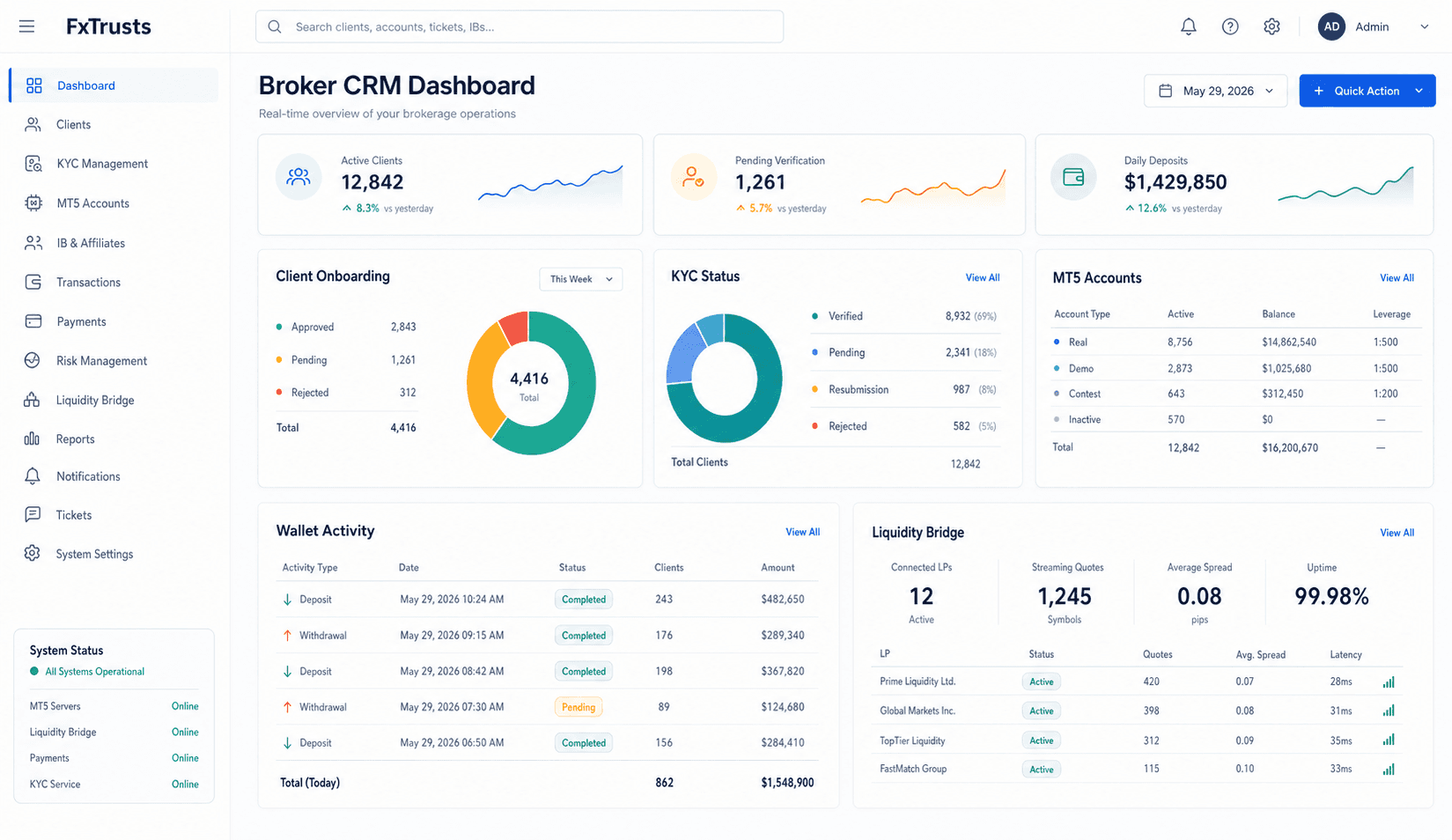
A forex CRM sits between sales, compliance, finance and client support. Each team works from the same client record, so a registration, a document review, a deposit and a commission payment are linked to one profile instead of spread across spreadsheets and inboxes. The back-office side covers the staff workflows behind a trading account, and the Trader’s Room is the client-facing portal that feeds them.
Product names in this category overlap. Some tools focus on sales pipelines with little back-office depth, and others cover only payments or only the trading server. Check each module against the list below, and against your own launch model, rather than comparing product names alone.
Key takeaways
- A forex CRM keeps the client record, KYC status, trading accounts, payments, IB links and support tickets in one system.
- The Trader’s Room is the client side of that system. Staff and clients should see the same status for each request.
- MT4 and MT5 connections depend on the server build and the Manager API permissions granted, so test them before launch.
- Broker CRM pricing is scoped. The $1,000 per month figure on the pricing page is for the prop firm CRM package.
- When you compare forex CRM software, ask for a written setup plan that names the owner of each integration and each acceptance test.

Forex CRM, back office
and Trader’s Room
The three parts of the stack have different users and jobs. They share data, so the setup plan should name which system is the source of truth for each field, such as KYC status or account balance.
Forex CRM
Main users: Sales, marketing, support
Main job: Lead pipeline, client record, follow-up tasks and lifecycle messages
Example workflow: Lead owners, follow-up queues, reactivation segments
Back office
Main users: Compliance, finance, operations
Main job: KYC review, approvals, deposits, withdrawals and reconciliation
Example workflow: Document status, payment matching, approval logs
IB and affiliate module
Main users: Partner managers, finance
Main job: Partner structures, commission rules and payouts
Example workflow: Multi-tier partner trees, payout reports
Trader’s Room
Main users: Clients
Main job: Registration, documents, funding and account requests
Example workflow: Upload KYC files, request a withdrawal, check status
- Forex CRM & Back Office: Centralized lead, client, KYC, account, IB, deposit, withdrawal, and support management for brokerage teams.
- Streamlined Financial Operations: Centralized hub for managing deposits, withdrawals, and internal transfers across multiple trading accounts.
- Comprehensive Profile Management: Secure storage for KYC documents, contact preferences, and security settings like Two-Factor Authentication (2FA).
- Trading Integration: Connect the approved platform workflows and verify equity, margin and balance data against the source system.
- Marketing & Engagement Tools: Lifecycle email, targeted notifications, segmented banners, and reactivation workflows that support client retention.
Before launch, test a complete client journey: register, submit documents, fund an account, and request a withdrawal. Include a failed payment and a rejected document in the test. Staff and clients should both see a clear status and the next action needed.
Platform Overview
Each staff role gets access to the tasks it needs. Sales users manage leads, compliance users review identity checks, and finance users match payments to account records. Agree the access rules, hosting, monitoring, and support before deployment.
Scoped
Monitoring coverage for deposits, onboarding and portal access.
Milestones
Deployment plan based on confirmed integrations and acceptance tests.
Per Provider
Connector feasibility is checked for each selected PSP before build.
By SLA
Support and incident coverage written into the agreement.
Who Needs a Forex CRM
A CRM for forex brokers is most useful when a broker has many clients to move through the same steps, several staff teams working on the same accounts, or introducing brokers who need commission records. A firm with a handful of accounts and one provider may manage with simpler tools for a while.
- New brokers launching with a white-label or hosted MT5 setup. Onboarding, KYC and funding need to work before the first client registers. See forex white label for the licensing and platform side.
- Established brokers moving client data off spreadsheets and separate tools into one record with an audit trail.
- Brokers with introducing broker networks that need multi-tier commission rules and payout records they can reconcile.
- Brokers taking several payment routes who need deposit and withdrawal status in one view. Compare the options in payment infrastructure.
- Prop trading firms should review the dedicated prop firm software for challenges, evaluations and funded-trader payouts.
If you are still deciding how to structure the business, the how to start a forex broker guide covers the licensing, banking and platform decisions that the CRM depends on.
MT5 Integration and Data Flow
The CRM does not replace the trading server. It reads and writes account data through the connection you approve, and staff act on the result. A typical flow for a live account looks like this:
- A client submits a registration, and the client profile is created in the CRM.
- After KYC approval, an account request goes to the MT4 or MT5 server through the Manager API, within the permissions granted for the deployment.
- The server returns the login, and the CRM stores it against the client record.
- The payment provider confirms funding. The back office matches the payment to the account and updates the balance view.
- Balance, equity and margin are read back for reporting. A mismatch should be routed to reconciliation rather than corrected by hand.
Test every step with failure cases: a rejected document, a failed payment, an unreachable server and a password reset. Confirm balance and equity in the CRM against the server before go-live, and record the test results in the acceptance file.
Why Trader’s Room?
Clear Client Journey
A clear registration, KYC and funding path gives each client one route to a funded account. Test every step on the devices your clients use.
Compliance Workflow
KYC and AML workflows route document checks, risk review and approvals to named staff, with a record of each decision.
Fewer Routine Tickets
Self-service tools for password resets, fund transfers, IB queries and account requests can reduce routine support tickets. Measure the change after launch.
Security & Trust
Documented transport and storage encryption, 2FA options and access controls support the agreed security design.
Cross-Platform Compatibility
Responsive layouts are tested on the agreed browser and device matrix before acceptance.
Enhanced Retention
Lifecycle messaging, trading journals, calendars, and segmented reactivation workflows help teams engage inactive and returning clients.
Multi-Language Support
Localize the portal for the languages you serve. The language list is confirmed in the written agreement.
White Label Branding
The Trader’s Room should look like part of your brand, not a third-party login page. Branding covers the portal interface, client emails and in-portal messaging, and the approved assets and layouts are agreed before build.
Custom User Interface
Apply your color palette, logo, and typography across the dashboard so clients see one consistent brand.
Branded Mobile Access
Whether through a web-responsive portal or a dedicated app, your brand identity remains consistent for on-the-go traders.
Custom Email Templates
Configured registration, transaction-status and service emails can use the approved brand templates.
Client Communication
Control the messaging within the portal, from custom banners and news feeds to pop-up notifications for specific client segments.
Server Hosting & Infrastructure
Choose hosting based on your user locations, expected traffic, and data requirements. The setup plan defines access controls, backups, and recovery steps. Load tests check how the portal responds when many clients sign in at once.
Data Center Locations
New York, USA
Equinix NY4 data center in the New York metro area.
London, UK
Equinix LD4 data center, Slough, UK.
Singapore
Equinix SG1 data center, Singapore.
Dubai, UAE
MENA region connectivity through an Equinix data center.
Infrastructure Specifications
Advanced Encryption
Transport and storage encryption requirements are documented and verified for the selected hosting and data stores.
Compliant Security
Hosting certifications, physical security controls and monitoring coverage are confirmed for the selected provider and region.
Regular Auditing
Agree vulnerability scanning, penetration-test cadence, remediation ownership and evidence access in the security schedule.
Data Redundancy
Replication, backup frequency, retention and restore tests are defined against agreed recovery objectives.
Scalable Performance
Capacity and load-balancing behavior are tested against agreed peak-load scenarios.
Security scope: Confirm encryption, environment separation, privileged access, transaction approval and audit controls in writing, then verify them during acceptance testing. The security design should document transport encryption, encryption at rest, 2FA coverage, privileged access, audit logging, retention and incident responsibilities for the selected deployment.
Platform Features
The Trader’s Room and the staff CRM cover the areas below. Each item is confirmed against the modules in your agreement.
Account Management
Account Creation
Create and manage live and demo accounts through approved MT4 or MT5 API workflows.
Real-Time Analytics
Monitor balance, equity, margin, funded-account activity, and inactive-client segments across accounts in real time.
Access Control
Route password-reset and leverage-change requests through the permissions and approval workflow agreed with the platform owner.
Internal Transfers
Internal transfers between trading accounts and wallets, recorded in the client history.
Reporting
Review transaction history alongside onboarding, deposit, withdrawal, trading-activity, and IB performance reports.
Analytics That a Forex CRM Should Track
Track these metrics from the same client record, and filter them by campaign, region, sales owner, payment method and partner.
- Lead-to-registration and KYC completion, plus funded-account conversion and time to first deposit.
- Deposit success and withdrawal processing, plus active and inactive clients and reactivation.
- Trading activity for each account, and IB partner performance.
Financial Tools
Multi-Currency Wallets
Support for major fiats and cryptocurrencies (USD, EUR, BTC, USDT, etc.).
Automated Deposits
Automate eligible deposit updates after provider confirmation, compliance checks and ledger reconciliation.
Withdrawal Tracking
Real-time withdrawal request tracking and status notifications.
Currency Conversion
Integrated currency conversion calculator for fund management.
Client money boundary: The CRM records deposits, withdrawals, balances and wallet activity. It does not make a broker licensed or compliant, and it does not replace the broker’s regulator obligations or client-money rules. Read the risk disclosure and confirm licensing with your regulator before accepting client funds.
Compliance & Support
Advanced KYC
Multi-tier KYC document upload and automated verification system.
Integrated Support
Built-in support ticket system or live chat widget integration.
Compliance Alerts
Automated notifications for expiring documents or KYC requirements.
API & Integration
Manager / Admin API
- Sync client data directly with backend CRMs.
- Extract financial reports for auditing.
- Manage IB structures and payouts.
Connectivity & Payment API
- Deep integration with payment gateways.
- Scoped MT4 or MT5 Manager API synchronization.
- Webhook events such as client.created, client.verified, account.created and transaction.completed, as listed in the API documentation.
Web API / SDK
REST API access can be scoped for approved front-end, mobile and operational workflows, subject to available endpoints and permissions.
Common Integrations
CRM Systems
Salesforce, HubSpot or a custom CRM can be connected where the connector is confirmed for the deployment; availability is connector-dependent.
KYC Providers
Examples to assess include Sumsub, Onfido and eligible local services; approval and API scope remain provider-dependent.
Payments
Evaluate eligible card, wallet, crypto and bank-transfer providers for the entity, country and business model; provider approval is separate.
A custom KYC or payment provider can be connected when its API, commercial approval, supported country, credentials and required workflow are in place. FxTrusts confirms connector feasibility and scope before implementation.
Buyer Checklist & Acceptance Tests
Use this list to compare forex CRM software vendors on the same basis. It also works as a quote request for a forex broker CRM, because a vendor can price only what the request describes.
Before you request a quote
- List your staff roles, expected client and account counts, trading servers, and payment and verification providers.
- Share your IB rules and any migration history, so commission and data scope can be priced.
- Separate broker CRM pricing from any prop challenge package, and confirm which connectors already exist.
- Ask which KYC and payment connectors are live today, and which still need provider approval.
- Ask for a written responsibility matrix that names the owner of hosting, monitoring and support.
Acceptance tests to agree
Test exceptions as well as successful registrations. Give sales, finance and support separate test users so the same event can be reviewed from each role.
MT4 or MT5 account mapping
What to test: Check that each client maps to the right trading login, then test balance reconciliation and a failed or delayed synchronization.
Evidence to keep: Mapping report and reconciliation log, with each failed or delayed sync shown with its resolution.
Duplicate deposit event
What to test: Deliver the same test payment notification twice, then temporarily interrupt the platform connector.
Evidence to keep: One credit, a traceable pending state and a controlled retry, not a second balance adjustment.
Withdrawal approval
What to test: Request a withdrawal and try approving it with a support-only user.
Evidence to keep: The permission boundary, the authorized approver and a recorded reason for any rejected request.
IB reconciliation
What to test: Trace a sample commission back to its partner, account, trade and effective commission rule.
Evidence to keep: A reproducible calculation, currency treatment and adjustment history that finance can export.
These are proposed acceptance tests to agree with your supplier. They are not results from a completed FxTrusts certification.
Pricing & Setup
Pricing as of 7 November 2026. Broker CRM pricing is quoted per deployment. It depends on the modules, MT4 or MT5 platforms, payment providers, KYC workflow and branding you need. The published $1,000 per month price on the pricing page applies to the prop firm CRM package, which is a separate offer. Request a scoped assessment for an exact broker quote based on your modules and integrations.
Typical Scope to Confirm
Trader’s Room Portal
Branding and responsive workflows written into the portal agreement.
Trading Server Sync
MT4 or MT5 connection, permissions and synchronization tests defined per deployment.
Compliance Module
Selected document, profile, provider-status and review workflows defined in scope.
Payment Gateways
Approved deposit and withdrawal providers selected after connector and eligibility review.
Optional Add-Ons
IB / Affiliate Module
Professional multi-tier commission and tracking system.
Investor Dashboards
Advanced PAMM/MAM dashboards for social trading.
Custom Mobile App
A dedicated branded mobile app, scoped per project. Store submission is confirmed in writing before build.
Local PSPs
Specialized payment gateway integrations for your region.
Setup Timeline
Setup timing is confirmed after branding, platform access, provider credentials, data migration and acceptance tests are scoped. The milestone plan should name each dependency and its owner.
01Branding
Collect approved assets and confirm the UI acceptance criteria.
02Infrastructure
Provision the agreed environments, access controls and observability.
03Integration
Configure approved platform and payment connections, then test error paths.
04Testing
Complete security, workflow, reconciliation and device acceptance tests.
05Go-Live
Release after written acceptance, rollback readiness and operator training.
Frequently Asked Questions
A forex CRM is the broker back-office system that connects leads, onboarding, KYC, trading accounts, deposits, withdrawals, IB tracking, and support tickets. Brokers use it to move clients from registration to funded account without manual spreadsheets or disconnected systems.
The forex CRM is the internal operating layer for sales, compliance, finance, support, and management. The Trader Room is the client-facing portal where traders verify identity, fund accounts, manage MT4 or MT5 logins, request withdrawals, and view account data.
Broker CRM pricing is quoted per deployment, based on the modules, MT4 or MT5 platforms, payment providers, KYC workflow, and branding you need. The $1,000 per month figure on the pricing page is for the prop firm CRM package, not a broker quote. Request a scoped assessment for a broker price.
Yes, if your MT4 or MT5 server build exposes the Manager API and the server grants the permissions for the workflows you select. If it does not, those workflows cannot run. Test account creation, balance updates, password actions, errors and reconciliation before production use.
Hosting may be provided as SaaS or managed infrastructure. The written agreement should identify hosting owner, capacity, monitoring hours, backup and recovery responsibilities, and any client-provided systems.
Evaluate native MT4/MT5 integration, KYC/AML and payment-gateway support, multi-tier IB/partner management, white-label branding, reporting and compliance controls, and how quickly it can be deployed.
For the published prop firm CRM price, see the pricing page. Broker CRM pricing is scoped separately.
Planning your implementation
- What does Forex Back Office Software & CRM cover?
- Connect the broker back office and client portal for onboarding, KYC, account management, funding, IB workflows and support.
- Who is it for?
- Sales, finance and operations teams managing the trader lifecycle.
How to evaluate forex back office software and CRM
The broker CRM is the staff workspace; the trader’s room is the client-facing portal. Evaluate them as one workflow. A useful demonstration follows a client from registration to verification, trading-account creation and a withdrawal request, showing what the client sees and what each staff role can approve. Check the controls as carefully as the dashboard design.
- Test MT4/MT5 account mapping, balance reconciliation and the way failed or delayed synchronization is handled.
- Review KYC status, deposit and withdrawal approvals, IB commission calculations and staff permission boundaries.
- Confirm data import/export, consent records, support handoffs and reporting requirements before setting a migration date.
Forex back office software: follow the money and permissions
A useful CRM demonstration covers exceptions as well as successful registrations. Give sales, finance and support separate test users so the same event can be reviewed from each role.
These are proposed acceptance tests to agree with your supplier, not results from a completed FxTrusts certification.
| Workflow | What to test | Evidence to keep |
|---|---|---|
| Duplicate deposit event | Deliver the same test payment notification twice, then temporarily interrupt the platform connector. | One credit, a traceable pending state and a controlled retry instead of a second balance adjustment. |
| Withdrawal approval | Request a withdrawal and try approving it with a support-only user. | The permission boundary, the authorized approver and a recorded reason for any rejected request. |
| IB reconciliation | Trace a sample commission back to its partner, account, trade and effective commission rule. | A reproducible calculation, currency treatment and adjustment history that finance can export. |
What to include in your quote request
List staff roles, client and account counts, trading servers, payment and verification providers, IB rules and migration history. Separate broker CRM pricing from a prop challenge package and confirm which connectors are already available.
Build a first-year cost worksheet (opens in a new tab) and check integration status (opens in a new tab) before finalizing the scope.
Guides and implementation resources
- Forex CRM selection guide (opens in a new tab)
- CRM workflows for prop firms and forex brokers (opens in a new tab)
- CRM account operations reference (opens in a new tab)
- IB commission calculations and controls (opens in a new tab)
- Forex back-office software explained (opens in a new tab)
- Integration status and scope (opens in a new tab)
Compare all products and services (opens in a new tab)Discuss your implementation scope (opens in a new tab)