
Broker Integration: How CRM, MT5, Payment and Liquidity Systems Connect
Broker integration is the set of links that let a brokerage's CRM, MT5 manager or server, payment providers and liquidity providers exchange accounts, balances, funding events and orders. Each link uses a method such as an API, a FIX session, a webhook or a scheduled file sync, and each needs a named owner and tests before go-live.
FxTrusts supplies CRM, prop-firm software and connectivity implementation for brokers and prop trading firms, so this guide includes our commercial perspective. It is general information, not legal, tax or investment advice. Platform access, payment processing and licensing depend on third-party vendors, providers and regulators, and each is confirmed in writing.
On this page
- What broker integration covers
- The four systems and the links between them
- Connection methods: API, FIX, webhook and file sync
- Which system pairs use which method, and who owns each link
- Worked example: one deposit across four systems
- Who answers when a link fails
- How to test a broker integration before go-live
- Scoping a broker integration project
- Key takeaways
- Frequently asked questions
What broker integration covers
In a forex or CFD brokerage, the systems rarely share one database. The CRM holds client profiles, onboarding status and funding requests. The MT5 server holds trading logins, groups, balances and positions. Payment providers confirm deposits and withdrawals, and liquidity providers quote prices and fill orders. Broker integration is the work of linking these systems so that one client action, such as a deposit, reaches every system that needs it, once and in the right order.
The term is ambiguous. Some searchers mean a partner or affiliate integration, such as an introducing broker connecting a referral tool to its website. This guide uses the narrower meaning: the system links inside a brokerage or prop firm. Partner programmes and affiliate tools are a separate topic, and the execution broker guide covers a different question, which is who routes and fills client orders.
The four systems and the links between them
Most brokers run four core systems, with a website or registration page feeding the CRM. The CRM and client portal holds the operating records, the MT5 server holds trading accounts, the payment infrastructure confirms money movement, and the liquidity connection carries prices and orders. The diagram shows the links we see most often and the party that usually owns each one.

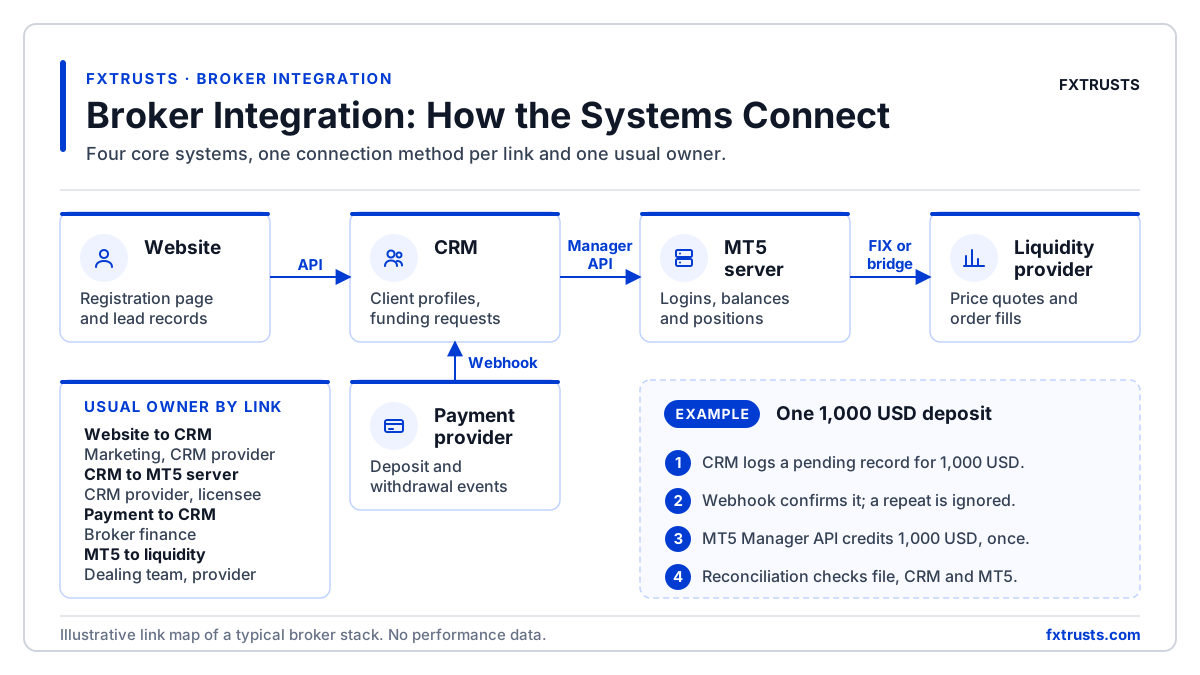
A practical test of an integration is whether a single fact, such as a client balance, reads the same in every system after a deposit, a withdrawal or a failed message. For the balance-sync link on its own, see the CRM and MT5 account balance sync article.
Connection methods: API, FIX, webhook and file sync
Four connection methods cover most links. They differ in who starts the message, how quickly a change appears and how easily a failure is noticed.
- API calls. One system asks another to act, such as creating a trading login or changing a group. MetaQuotes describes the MetaTrader 5 Manager API as the interface for custom administration and management tools. Access depends on the manager credentials and the server build, so confirm it in writing.
- FIX sessions. FIX is an open, technology-neutral specification for electronic trading and trade processing, maintained by the FIX Trading Community. A FIX session carries order instructions and execution reports between a broker and a liquidity provider, using sequence numbers and heartbeats so that gaps and dropped sessions can be detected.
- Webhooks. A payment provider or internal service pushes an event, such as a confirmed deposit, to an address you publish. Webhooks are fast, but the receiver must detect duplicates and gaps, so it should store each event reference and ignore repeats.
- Scheduled file sync. One system exports a file at a set time and another imports it. It is simple to audit and common for finance reporting, but it is always behind the live state by the length of the schedule.
Which system pairs use which method, and who owns each link
The table maps each common link to a typical method and owner. Treat it as a starting point, because the written scope for each deployment decides the real owner.
| System pair | Typical method | Who usually owns the link |
|---|---|---|
| CRM to MT5 server | Manager API calls for account creation, group and balance actions, with a sync log | CRM provider and the MT5 licence holder, under a written scope |
| Website to CRM | Web API or registration iframe that writes lead and onboarding records | Broker marketing and the CRM provider |
| Payment provider to CRM | Webhook or status API, plus a daily settlement file | Broker finance, with the payment provider |
| MT5 server to liquidity provider | Bridge, gateway or FIX session for quotes and order routing | Broker dealing team, the liquidity provider and the integrator |
| CRM to finance reports | Scheduled export or query against the CRM ledger | Broker finance and operations |
- CRM to MT5 serverTypical method: Manager API calls for account creation, group and balance actions, with a sync logWho usually owns the link: CRM provider and the MT5 licence holder, under a written scope
- Website to CRMTypical method: Web API or registration iframe that writes lead and onboarding recordsWho usually owns the link: Broker marketing and the CRM provider
- Payment provider to CRMTypical method: Webhook or status API, plus a daily settlement fileWho usually owns the link: Broker finance, with the payment provider
- MT5 server to liquidity providerTypical method: Bridge, gateway or FIX session for quotes and order routingWho usually owns the link: Broker dealing team, the liquidity provider and the integrator
- CRM to finance reportsTypical method: Scheduled export or query against the CRM ledgerWho usually owns the link: Broker finance and operations
Two points matter most. First, a link is only as good as its owner: if no one is named, failed messages sit unseen. Second, the method sets the test plan. A webhook needs duplicate tests, a FIX session needs sequence-gap tests, and a file sync needs a cut-off check.
Worked example: one deposit across four systems
A single deposit touches several links. The steps below use hypothetical numbers only. They are not market data and do not describe any real client or provider.
- The client submits a deposit of 1,000 USD in the client portal. The CRM creates a pending funding record with a unique internal reference.
- The payment provider sends a webhook confirming the payment. The CRM stores the provider reference and ignores any repeat of that event.
- The CRM calls the MT5 Manager API to credit 1,000 USD to the client's trading login, and the MT5 server returns a confirmation that the CRM logs.
- A scheduled reconciliation compares the provider settlement file, the CRM ledger and the MT5 balance. Any difference goes to a review queue with a named reviewer.
Illustrative example
A deposit of 1,000 USD is confirmed once by the provider and credited once in MT5. If the webhook arrives twice, the balance must still change only once. The CRM record should show the provider reference, the MT5 confirmation and the reviewer for any exception.
Who answers when a link fails
Failures are normal. What matters is how quickly they are seen and who acts. Put these controls into the written scope before build starts.
- Name one owner per link, with a contact route and an escalation time agreed in writing.
- Log every message with an identifier, a timestamp and a status, so that a failure can be traced without guessing.
- Define retry rules. An automatic retry must never create a second balance adjustment.
- Keep a manual procedure for the day a link is down, including who approves a balance correction and how it is recorded.
FxTrusts commits directly to CRM, prop-firm software and technical infrastructure. Platform access, payment processing and licensing depend on third-party vendors, providers and regulators. The platform integration status page shows the connector status we record for each platform, so check the status and test record before you rely on a connector.
How to test a broker integration before go-live
Acceptance tests are where most integrations are proven or rejected. Agree them before build starts, so that the tests are not written around whatever was delivered.
- Map each client to the right trading login, and check the mapping against a sample of records in a test environment.
- Test balance reconciliation for a deposit, a withdrawal and a reversal, and confirm that the closing figures match across the CRM, the provider and MT5.
- Deliver the same payment notification twice, and confirm that the balance changes once.
- Interrupt the connector on purpose, then confirm that queued messages are delivered in order after recovery.
- For FIX links, test session restart, sequence-number gaps and order cancel or replace flows. The FIX Trading API certification test page describes the certification steps FxTrusts uses for that API.
- Run the reconciliation report for at least one full settlement cycle before live client traffic.
Scoping a broker integration project
A scope document should answer five questions: which platform build is in use and whether its Manager API is exposed, which payment providers and webhook events are needed, which liquidity provider and connection method apply, which reports finance requires, and who holds each licence and contract. Missing answers are the most common reason a launch date slips.
Published FxTrusts scope
The Prop Firm CRM, Risk and Admin package is published at $1,000 per month for one brand and one named MT5, cTrader or RTX5 connector. It excludes the trading-platform licence and third-party API charges. Hosted MT5 Manager Access is published at $3,500 per month, subject to written platform and host authorisation. Compare these with the pricing page scope notes before you budget.
Key takeaways
- Broker integration is the set of links between the CRM, the MT5 server, payment providers and liquidity providers, not one product.
- Each link needs one named owner, one connection method and a written test plan.
- API calls, FIX sessions, webhooks and file syncs fail in different ways, so each one needs its own tests.
- Reconciliation across the CRM, the payment provider and the MT5 balance is the control that shows whether the integration works.
- Confirm platform access and API permissions in writing before you commit to a launch date.
Frequently asked questions
What does broker integration mean?
Broker integration means linking the systems a brokerage runs, mainly the CRM, the MT5 manager or server, payment providers and liquidity providers, so that accounts, balances, funding events and orders agree across them. It is a set of individual links rather than one product. Each link needs a connection method, an owner and tests that cover duplicates, delays and failures.
What is the difference between an API and a FIX connection for a broker?
An API is a request-and-response call, such as creating an account or changing a balance. A FIX connection is a long-running session, defined by an open standard, that carries order instructions and execution reports, with sequence numbers and heartbeats to detect gaps. Brokers usually use APIs for administration and FIX, or a bridge, for trading and liquidity flows.
Can a CRM manage MT5 accounts without the Manager API?
Account administration through a CRM usually relies on the MT5 Manager API or a hosted equivalent. The FxTrusts Trader Room page states that the MT5 workflows run only if the server build exposes the Manager API and the server grants the permissions for the workflows selected. Confirm this with the platform provider before you buy, and test balance updates and password actions first.
How long does a broker integration take?
There is no reliable universal timeline. Duration depends on the number of links, the platform build, the approvals each provider needs and the number of test cycles. Ask for a milestone plan that shows dependencies and the owner of each step. A software delivery estimate is not the same as a provider approval or banking timetable.
Why does a deposit appear twice or not at all?
Duplicate or missing confirmations usually come from a webhook retry, a timeout with no acknowledgement, or a file imported twice. The usual fix is idempotency: store a unique provider reference and reject any event you have already processed. Daily reconciliation then catches any deposit that was missed or doubled.
Related FxTrusts resources
- Brokerage as a service explained
- Execution broker model
- Platform integration status matrix
- Liquidity connectivity for brokers
- Payment infrastructure for brokers
Sources
Map your broker integration
Share your current platform, CRM, payment and liquidity set-up, and ask for a written link map with an owner and a test plan for each link.
Contact FxTrusts