
Forex Netting Explained: Netting vs Hedging on MT5
Forex netting is an account position model in which the platform keeps one position per symbol, such as EURUSD. Opposite trades reduce or offset that position rather than opening separate ones. MetaTrader 5 supports netting and hedging, and the broker decides which mode applies to each account.
FxTrusts supplies brokerage technology to forex and CFD brokers and prop trading firms, so this guide includes our commercial perspective. It is general information, not legal, tax or investment advice. Trading leveraged FX and CFDs carries a high risk of losing money quickly.
On this page
- What forex netting means
- Netting versus hedging on MT5
- Position handling, margin and closing
- Worked example: two trades on one symbol
- How MT5 identifies the account mode
- What netting changes for brokers and prop operators
- Questions to ask before you choose a mode
- Risk and client communication
- Key takeaways
- Frequently asked questions
What forex netting means
Netting describes how an account records open trades in the same symbol. On a netting account, the platform holds one position per symbol, so a new trade in the opposite direction reduces that position instead of opening a second one. The result is a single net exposure per symbol, such as EURUSD.
The term has two common uses. In a trading platform, it describes position accounting. In treasury and settlement work, netting can also mean offsetting payment obligations between counterparties. This guide covers the trading-platform meaning, which is the one that shapes MT5 accounts.
Netting matters to a broker because it sets how client positions appear in the platform, how a close is recorded and how the back office reads the book. Decide the account mode with your technology, risk and operations leads before the first client account is opened.
Netting versus hedging on MT5
MetaQuotes describes two position systems in its MetaTrader 5 help on trading principles (Android). In netting, only one common position for a symbol can exist at a time. In hedging, you can hold several positions on one symbol, including opposite ones. The same page states that the broker decides which system applies to an account.
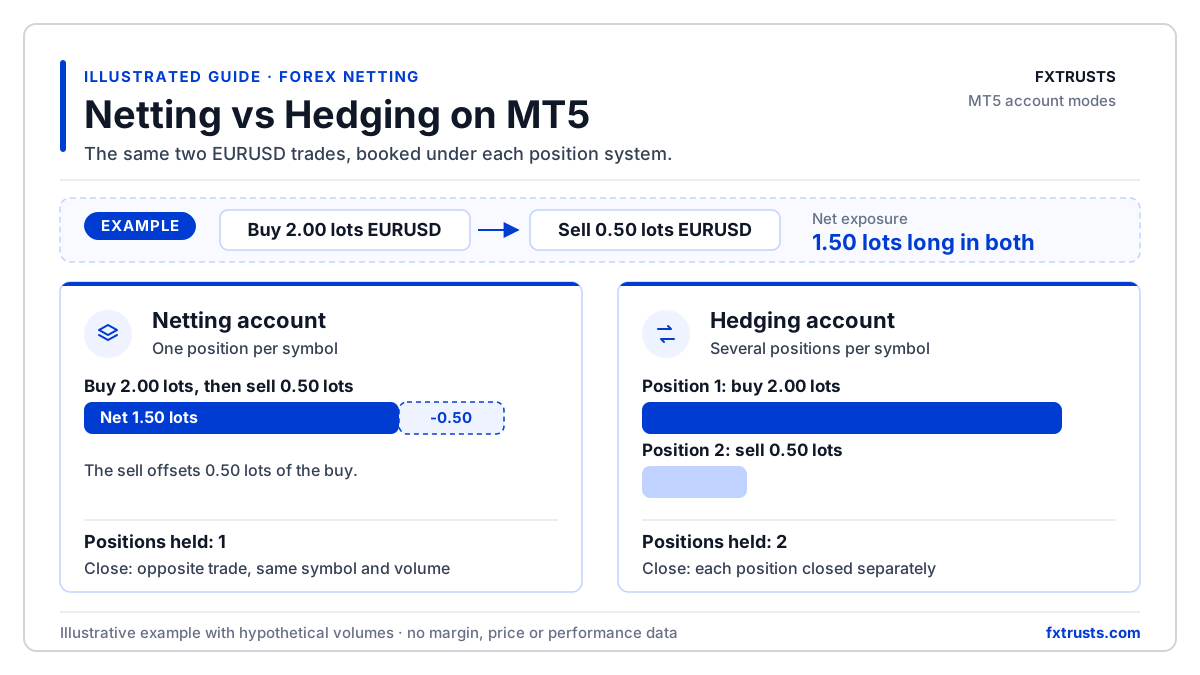
The diagram below shows the same two trades under each system, so the difference in position count and close steps is visible without reading the table first.

Position handling, margin and closing
The table compares the points operators ask about most often. The margin row describes the calculation rules, not a number. Margin depends on symbol settings, leverage and the broker’s configuration.
| Point | Netting account | Hedging account |
|---|---|---|
| Positions per symbol | One position per symbol at a time | Several positions per symbol, including opposite ones |
| Adding an opposite trade | Offsets or reduces the existing position | Opens a separate position; existing positions stay open |
| How a close works | An opposite trade on the same symbol and volume closes the position | Each position is closed explicitly |
| Margin rule (MQL5 mode) | RETAIL_NETTING: margin calculated based on the symbol type (SYMBOL_TRADE_CALC_MODE) | RETAIL_HEDGING: same calculation, taking the hedged margin (SYMBOL_MARGIN_HEDGED) into account |
- Positions per symbolNetting account: One position per symbol at a timeHedging account: Several positions per symbol, including opposite ones
- Adding an opposite tradeNetting account: Offsets or reduces the existing positionHedging account: Opens a separate position; existing positions stay open
- How a close worksNetting account: An opposite trade on the same symbol and volume closes the positionHedging account: Each position is closed explicitly
- Margin rule (MQL5 mode)Netting account: RETAIL_NETTING: margin calculated based on the symbol type (SYMBOL_TRADE_CALC_MODE)Hedging account: RETAIL_HEDGING: same calculation, taking the hedged margin (SYMBOL_MARGIN_HEDGED) into account
MetaQuotes also states that a position cannot be reversed in the hedging system. A reversal on a hedging account is therefore a separate close and a new open, which should be tested as two steps.
Worked example: two trades on one symbol
Take a hypothetical client who trades EURUSD in two steps. The volumes are invented for explanation. They are not market data and not a performance result.
- Buy 2.00 lots of EURUSD.
- Sell 0.50 lots of EURUSD.
Illustrative example
On a netting account, the client holds one buy position of 1.50 lots, because the 0.50-lot sell offsets part of the 2.00-lot buy. On a hedging account, the client holds two positions: a 2.00-lot buy and a 0.50-lot sell, each closed separately. Total directional exposure is 1.50 lots long in both cases, but the position count and close steps differ. This example does not show a margin figure, because margin depends on the broker’s settings.
How MT5 identifies the account mode
MetaQuotes says the system used depends on the account and is set by the broker. Developers can read the margin mode from the terminal. In MQL5, the ACCOUNT_MARGIN_MODE property, read with AccountInfoInteger(), returns one of three values.
- ACCOUNT_MARGIN_MODE_RETAIL_NETTING: used for the OTC markets to interpret positions in the netting mode (only one position can exist for one symbol). Margin is calculated based on the symbol type (SYMBOL_TRADE_CALC_MODE).
- ACCOUNT_MARGIN_MODE_RETAIL_HEDGING: used for the exchange markets where individual positions are possible (multiple positions can exist for one symbol). Margin uses the same calculation and takes the hedged margin (SYMBOL_MARGIN_HEDGED) into account.
- ACCOUNT_MARGIN_MODE_EXCHANGE: used for the exchange markets. Margin is calculated from the discounts in the symbol settings, which the broker sets but which cannot be lower than the exchange values.
Who sets the mode
The broker sets the mode, so confirm it for each account group in writing. Do not assume that a demo environment reflects the live configuration. Check the value your code will receive on the account type you will actually run.
What netting changes for brokers and prop operators
For a brokerage, netting affects the client view, the reporting layer and the way the back office reconciles open positions. For a prop evaluation business, it can also affect how challenge rules count exposure. Map each client-facing screen and report to the position model before launch.
- Record the account mode for each account group in the account set-up file.
- Test partial closes, full closes and reports with the volumes you expect to see in production.
- Check that risk and exposure reports read the net position from the platform, not from a separate ledger.
- Document how copy-trading, IB and reporting tools read positions and volumes under each mode.
FxTrusts’ white-label brokerage technology describes the scope we propose: the broker keeps its entity, client terms and marketing, and providers supply named technology layers. Platform access depends on the licence or access holder named in the contract. Hosted access is covered on the hosted platform access page.
Position design sits beside execution design. If orders go to external liquidity, the account mode governs how the platform records the resulting position. Review it alongside the liquidity scope and the execution broker model.
Questions to ask before you choose a mode
Put these questions to your platform provider and broker in writing. The answers belong in the signed scope, not in a call note.
- Which account mode applies to each account group, and can it differ by account type?
- How does the platform report a partial close, a full close and an opposite-direction order to the CRM and the back office?
- Which MT5 features, Expert Advisors and copy tools are supported under that mode?
- What is the change process if the mode must be altered after accounts exist?
- Which licence or access holder is named for the MT5 environment?
The MT5 white-label solutions guide sets out the wider decisions that sit around this one.
Risk and client communication
Netting and hedging change how positions are shown and closed. They do not change how much a leveraged trade can gain or lose. Leveraged FX and CFD trading carries a high risk of losing money quickly. The European regulator ESMA reported in 2018 that 74-89% of retail accounts typically lose money on CFD trading, and in the EU it introduced leverage limits and a standard risk warning. For background on the instrument, read the CFD glossary entry.
Describe the mode in client terms
Client material should explain how a close works on the account the client holds. Do not present netting or hedging as a way to reduce risk or margin unless you have tested evidence for that claim.
Key takeaways
- Netting keeps one position per symbol on MT5. Hedging keeps each trade as its own position.
- The broker sets the account mode, so confirm it for each account group in writing.
- Test partial closes, full closes and reports under the mode you will run, before clients trade.
- Margin depends on symbol settings and the broker’s configuration. The mode alone does not set a margin outcome.
- Netting changes how positions appear and close. It does not change how much a leveraged trade can lose.
Frequently asked questions
What is forex netting?
Forex netting is an account position model in which the platform holds one net position per symbol. A new trade in the opposite direction reduces or offsets that position. On MetaTrader 5 it is one of two systems, the other being hedging, and the broker decides which one applies to each account. The term can also describe offsetting payment obligations in treasury work, which this page does not cover.
What is the difference between netting and hedging on MT5?
Netting allows one position per symbol, so opposite trades offset it. Hedging allows several positions on one symbol, including opposite ones, and each position is closed separately. MetaQuotes also states that a position cannot be reversed in the hedging system. The margin rules depend on the symbol settings and the broker’s configuration, so check them for your account before you rely on any figure.
Can a broker switch an account between netting and hedging?
The broker sets the system for each account, so the mode is a configuration decision rather than a client setting. Ask the provider how a change would be applied, which open positions it affects and how the change is recorded. Put the answer in writing, and test the change in a non-production environment before it is used with live clients.
Does netting change how an Expert Advisor closes trades?
It can. MetaQuotes documents that closing on a netting account is done with an offsetting trade on the same symbol and volume, while hedging positions are closed separately. Code that tracks positions by ticket, or assumes several positions per symbol, needs testing on the account type you run. Read ACCOUNT_MARGIN_MODE before the Expert Advisor opens its first order.
Which mode should a new brokerage choose?
This is a commercial and operational decision rather than a fixed rule. Base it on the markets, client products, trading strategies and back-office design you need, and on what your platform provider can support in writing. Confirm the choice with your technology, risk and compliance leads before the first client account is opened.
Related FxTrusts resources
- MT5 white-label solutions guide
- FxTrusts white-label brokerage technology
- Hosted platform access
- Execution broker guide
- MT5 for prop firms
Sources
- MetaQuotes MetaTrader 5 help, trading principles (Android mobile help page)
- MQL5 documentation: ACCOUNT_MARGIN_MODE
- ESMA: restrictions on CFDs to protect retail investors (2018)
Scope your account mode in writing
Send your account groups, target markets and back-office design. Ask for a scoped proposal that lists the platform, responsibilities and tests for your account structure.
Contact FxTrusts