
MT5 for Prop Firms: Operator Setup Checklist and Rule Configuration
Running MT5 for prop firms means configuring a MetaTrader 5 environment to run an evaluation or funded-trader programme under documented rules. It covers account groups, trade conditions and manager access in MT5, plus the risk logic that measures drawdown, daily loss and profit targets. Map each rule to a named setting and an owner before go-live.
FxTrusts supplies brokerage and prop-firm technology, so this guide includes our commercial perspective. It is general information, not legal, tax or investment advice. Prices quoted are published FxTrusts scope, not market averages, and nothing here guarantees a licence, a platform approval or any trading result.
On this page
- What MT5 for prop firms involves
- Operator checklist before you configure MT5
- Map each prop rule to an MT5 or platform setting
- Worked example: drawdown headroom on equity and balance
- Platform and connector scope for a prop operation
- Hosting, licensing and manager access
- Expert advisors, event windows and trading restrictions
- Testing rules before go-live
- Guardrails for marketing and product claims
- Key takeaways
- Frequently asked questions
What MT5 for prop firms involves
A prop firm runs a trading programme in which a trader operates a firm-funded or firm-simulated account under the rules in its terms, usually after passing an evaluation. The firm's terms set the profit share, the stages and any funded arrangement. MetaTrader 5 is the terminal and server that places and records the trades. On its own it does not know your evaluation rules.
The setup work is therefore two jobs. The first is the MT5 side: account groups, trade conditions, manager access and the account modes you allow. The second is the rule layer that measures each account and decides what happens next, including stage changes, breach handling and payout review. A common failure is a rule written in general terms and then implemented differently by each system that touches the account.
Operator checklist before you configure MT5
Work through these steps in order. Each one produces a document or a test result that the next step depends on.
- Write the rule book with definitions rather than adjectives. For each rule, record the start point, the measure, the reset time and the time zone.
- Decide whether each account stage is simulated or live, and state it in the terms. Simulated evaluation stages and any live-capital arrangement are governed differently.
- Confirm the licence holder and the permitted use of the MT5 platform. A hosted or white-label route must be verified in writing before go-live. Do not assume a direct MetaQuotes licence is in place.
- Create an account group for each programme stage, and let trade conditions and permitted instruments differ only where the rule book says so.
- Set trade conditions for each group, including margin, swaps, spreads, commissions and trade sessions.
- Choose the account mode, netting or hedging, for each programme, and document how the rule book treats opposing positions.
- Grant manager and API access by role. Give the risk service read access to account state and only the write permissions it needs.
- Run breach, reset and payout tests in a demo or staging environment and keep the evidence.
- Sign off the go-live list with a named owner for every rule.
Map each prop rule to an MT5 or platform setting
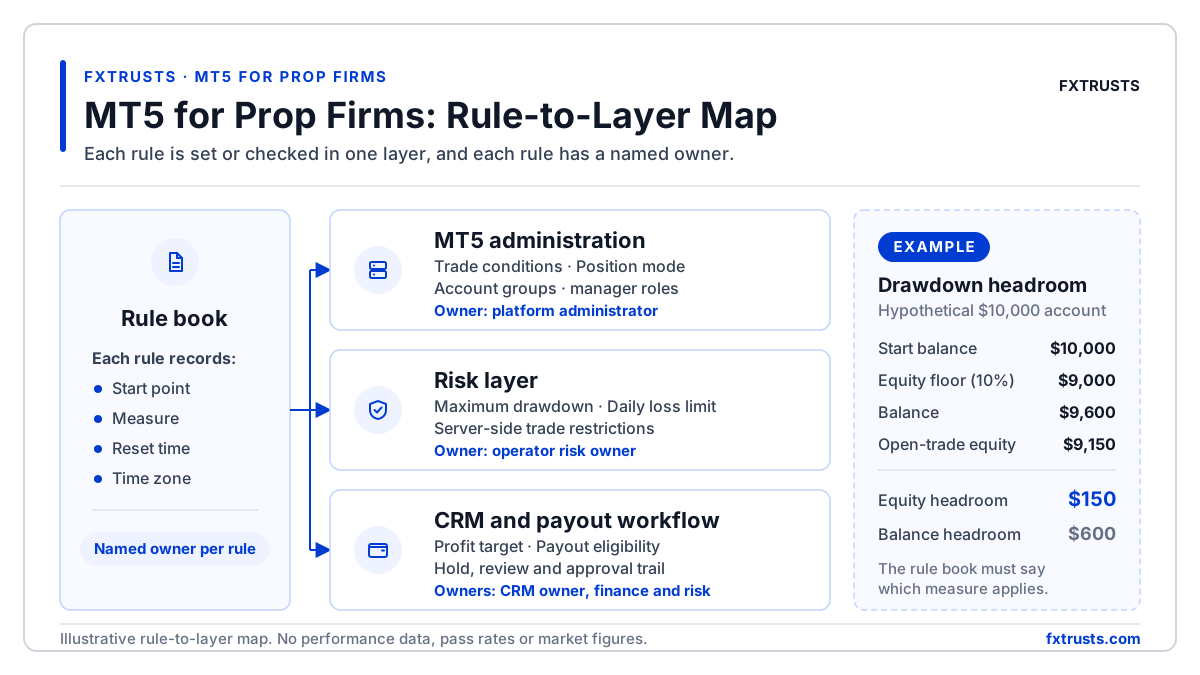
The map below separates the rules that MT5 administration configures from the rules that a risk or CRM layer has to measure and act on. The split matters because the MetaQuotes pages cited in this guide describe trade conditions and manager roles, not prop drawdown floors. A prop rule that is not written into the risk layer may not be checked at all.

| Prop rule | Definitions to write down | Where it is set or checked | Typical owner |
|---|---|---|---|
| Maximum drawdown | Balance or equity basis, start point, floor, and whether closed profit lifts the floor | Risk or CRM layer reads balance and equity; MT5 group settings are not a drawdown check | Operator risk owner |
| Daily loss limit | Start point, reset time, and the agreed time zone | Risk layer, using account state from the manager interface | Operator risk owner |
| Profit target | Net or gross basis, treatment of commissions and swaps, minimum trading days | CRM stage logic, with the same definition as the terms | Operator and CRM owner |
| Trade restrictions | Instruments, event windows, strategies and expert advisor use | Risk layer for server-side blocks; AutoTrading and per-EA permission for client-side control | Risk owner and platform administrator |
| Trade conditions | Margin, swaps, spreads, commissions and trade sessions for each group | MT5 administrator group settings | Platform administrator |
| Position mode | Netting or hedging, and handling of opposing orders | Account mode set on the platform; confirm with your provider | Platform administrator |
| Payout eligibility | Hold period, review checks and who approves | CRM payout workflow with an audit trail | Finance and risk |
- Maximum drawdownDefinitions to write down: Balance or equity basis, start point, floor, and whether closed profit lifts the floorWhere it is set or checked: Risk or CRM layer reads balance and equity; MT5 group settings are not a drawdown checkTypical owner: Operator risk owner
- Daily loss limitDefinitions to write down: Start point, reset time, and the agreed time zoneWhere it is set or checked: Risk layer, using account state from the manager interfaceTypical owner: Operator risk owner
- Profit targetDefinitions to write down: Net or gross basis, treatment of commissions and swaps, minimum trading daysWhere it is set or checked: CRM stage logic, with the same definition as the termsTypical owner: Operator and CRM owner
- Trade restrictionsDefinitions to write down: Instruments, event windows, strategies and expert advisor useWhere it is set or checked: Risk layer for server-side blocks; AutoTrading and per-EA permission for client-side controlTypical owner: Risk owner and platform administrator
- Trade conditionsDefinitions to write down: Margin, swaps, spreads, commissions and trade sessions for each groupWhere it is set or checked: MT5 administrator group settingsTypical owner: Platform administrator
- Position modeDefinitions to write down: Netting or hedging, and handling of opposing ordersWhere it is set or checked: Account mode set on the platform; confirm with your providerTypical owner: Platform administrator
- Payout eligibilityDefinitions to write down: Hold period, review checks and who approvesWhere it is set or checked: CRM payout workflow with an audit trailTypical owner: Finance and risk
Confirm the exact enforcement mechanism with your provider before go-live. The table describes common patterns. It is not a guarantee of how a given MT5 build, manager tool or risk product will behave in your deployment.
Worked example: drawdown headroom on equity and balance
Balance-based and equity-based drawdown can give different answers on the same account, because open trades move equity but not closed balance. The arithmetic is simple. The rule book has to say which measure applies, and the maximum drawdown calculation entry sets out the general method.
Illustrative example
A hypothetical account starts at $10,000 with a 10% equity-based maximum drawdown, so the floor is $9,000. If the balance is $9,600 and open trades show equity of $9,150, the headroom is $150. A balance-based rule would show $600 of headroom on the same account, so the two rule books would produce different breach decisions. These numbers are invented for the example. They are not market data, a pass rate or a profit figure.
Daily loss works the same way. A rule that resets at a set time and measures from the day's starting equity needs the time zone and start point written down before the risk layer reads the first tick. The daily loss limit reset entry covers that calculation in more depth.
Platform and connector scope for a prop operation
For a prop operation the scope question is which trading platform connects to which CRM and risk layer, and which charges sit outside the software fee. The Prop Firm CRM, Risk and Admin scope connects one named MT5, cTrader or RTX5 platform under signed scope. It does not include the trading platform licence or third-party vendor API charges. Compare white-label routes in MT5 white-label solutions.
- The published Prop Firm CRM, Risk and Admin price is $1,000 per month. It is a prop-firm package, not a general brokerage CRM price.
- Hosted MT5 Manager Access is a separate subscription, unless a signed bundle states otherwise, at $3,500 per month, with a proposed allowance of 500 real-account and 10,000 demo-account slots, subject to written host approval.
- The 10% setup coordination fee applies only to approved, documented one-time third-party setup costs. It excludes subscriptions, regulatory capital and client funds.
Hosting, licensing and manager access
MetaQuotes describes MetaTrader 5 for brokers as software that the broker deploys on its own infrastructure. It offers three licence types, Entry, Standard and Enterprise, which differ by account count and components. The MetaQuotes broker page also states that MetaQuotes does not offer SaaS. A prop operator using a hosted route therefore needs written evidence of who holds the licence and what the host is allowed to do.
Manager access should be role-based. Manager roles can be set so that a risk service reads account state without holding rights to change trades. The Manager API permissions guide covers how to design those roles. FxTrusts' hosted platform access scope is confirmed in writing before contracting, and the published pricing makes platform and host authorisation a condition for the hosted manager slots.
Expert advisors, event windows and trading restrictions
Restrictions on automated trading come in two forms. The first is client-side. MetaTrader 5 has a platform-wide AutoTrading switch and a per-EA permission, and when AutoTrading is off, no EA can trade even if it is enabled individually. The MetaQuotes help page on Expert Advisors describes these controls. They help the trader manage the terminal. They should not be treated as the firm's enforcement control.
The second form is server-side. The operator's risk layer blocks, flags or reviews orders against the rule book. Event-window rules need the same discipline as drawdown rules. Define which events count, the window before and after each event, the instruments affected, and whether a trade is blocked, flagged or sent to manual review.
Testing rules before go-live
- Force a breach on each rule at the threshold and one tick beyond, and confirm the account state changes as the rule book says.
- Test equity and balance separately, including an open floating loss that recovers before the day ends.
- Trigger a daily reset at the boundary time in the agreed time zone and check the start point the risk layer uses.
- Check the profit target with the same net or gross definition the terms use, including commissions and swaps where they count.
- Run a payout request through hold, review and approval, and confirm the audit record names the approver.
Guardrails for marketing and product claims
A prop programme sells access to a trading evaluation, and its marketing must not imply returns. Do not publish a pass rate, a payout promise or a claim that a rule is easy to pass unless you hold the data and the method to support it.
Where the programme involves leveraged CFDs offered to UK retail clients, the FCA has confirmed permanent restrictions that limit leverage to between 30:1 and 2:1 and require firms to guarantee that a client cannot lose more than the funds in the account. The FCA's announcement of the permanent restrictions is the baseline to check against. Leverage increases losses as well as gains, so any rule book that uses leverage should say so in plain terms. See the CFD glossary entry for the product definition.
Key takeaways
- Write the rule book first. MT5 settings can only implement what the rule book defines.
- Separate MT5 administration from risk-layer measurement, and name an owner for each rule.
- Balance and equity drawdown can give different answers on the same account, so choose one and document it.
- Verify the licence holder and host authorisation in writing before go-live.
- Test every breach, reset and payout path with recorded evidence, and avoid return or pass-rate claims.
Frequently asked questions
Does MT5 enforce prop firm drawdown rules on its own?
MetaQuotes describes MT5 trade conditions, account groups, trade sessions and manager roles. Drawdown, daily loss and profit target checks are normally run by the operator's risk or CRM layer, which reads account state and acts on it. Confirm with your provider which system measures each rule, how often it runs, and what action follows a breach.
Do prop firms need their own MetaTrader 5 licence?
Not every deployment requires the operator to hold a direct MetaQuotes licence. A hosted or white-label structure may be used, but the licence holder and the permitted use must be verified in writing before go-live. FxTrusts' published pricing ties hosted manager access to platform and host authorisation.
Should a prop firm use netting or hedging accounts in MT5?
MetaQuotes describes netting for exchange instruments and a hedging option for forex trading, which MT5 added in a later build. The right choice depends on the rule book. If the programme allows opposing positions, the drawdown and position logic must handle them. If it does not, the platform setting must match the rule. Document the mode for each programme and test an opposing-order case before go-live.
Is an evaluation account a real trading account?
It depends on the programme. Some evaluation stages are simulated, and some funded or live-capital arrangements use real accounts under separate terms. The terms should say which stage is simulated or live, how profit shares and payouts are calculated, and whether any live capital is separately approved. Check the terms before you describe the account in marketing.
What should I test first when setting up an MT5 prop programme?
Start with the breach paths, because a missed drawdown or daily loss check is the most costly failure. Force each threshold at the exact level and one tick beyond, then check the account state, the trader message and the audit record. Next, test the daily reset boundary, the profit target and the payout hold.
Related FxTrusts resources
- Prop Firm CRM, risk and admin software
- Prop challenge rules explained: drawdowns and evaluation periods
- Broker integration guide
- Funded account glossary entry
Sources
- MetaQuotes: MetaTrader 5 for brokers
- MetaQuotes help: Expert Advisors and AutoTrading
- MetaQuotes: MT5 hedging option
- FCA: permanent restrictions on CFDs sold to retail consumers
Scope your MT5 prop setup with FxTrusts
Send us your rule book, your planned platform and your programme stages. We will map which rules sit in MT5 administration and which sit in the risk layer.
Contact FxTrusts